Using Barby and Prawn to imprint PDFs with individual barcodes
For a Rails project, I researched methods to generate individual PDFs with imprinted EAN barcodes. This guide documents a working approach using modern Ruby libraries.
Libraries Used
Barby is a barcode generator library for Ruby that generates barcodes as images or PDFs. Prawn is a PDF generation library for Ruby that creates PDFs from scratch and annotates existing PDFs with text, images, and barcodes.
Implementation Approach
The solution uses two model classes:
- A voucher class with a
codeproperty (printed as a barcode) - A PDF generation class that subclasses
Prawn::Document
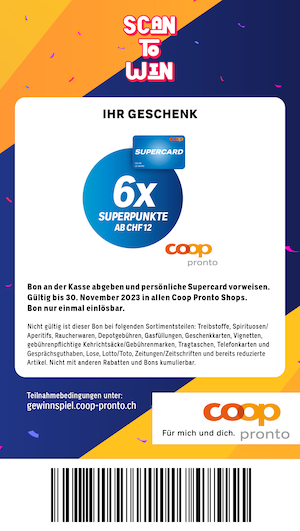
The PDF generation class accepts a path and code as arguments, generates a PDF with the barcode imprinted, and returns the path to a temporary file that is automatically deleted when the Rails process exits.
PDF Specifications
The resulting PDF is 100mm x 133mm with a PNG background image. Initially, the background option of Prawn::Document was tested but didn’t scale the image properly. Instead, the image method with the fit option scales the image to the page size.
Prawn’s measurement_extensions allow using millimeters as a unit instead of the default 1/72 inch.
Code Example
require "barby/barcode/code_128"
require "barby/outputter/prawn_outputter"
require "prawn/measurement_extensions"

class CodePdf < Prawn::Document
  def initialize path, code, background
    super({
      page_size: [100.mm, 177.mm],
      margin: 0
    })

    image background, fit: [100.mm, 177.mm]
    barcode code
    render_file path
  end

  def barcode code
    barcode = Barby::Code128.new code
    barcode.annotate_pdf self, height: 18.mm, x: 17.mm, y: 3.mm
  end
end
Voucher Generation
In the code class, a temporary file is created and the PDF generation class is called. The background image is located in the app/assets/images/{language} directory. The I18n.locale method returns the current locale (e.g., de or fr) to find the correct background image:
def voucher
  # Create temporary file e.g. tmp/voucher20230805-66997-kozjms.pdf
  tmpfile = Tempfile.new "voucher", Rails.root.join("tmp")
  path = tmpfile.path + ".pdf"
  bg_path = Rails.root.join "app", "assets", "images", I18n.locale.to_s, price.voucher
  CodePdf.new path, code, bg_path
  path
end
Here is an example of the resulting voucher PDF with the barcode: